
PVZerium
    Log in

    Everything for order
    at every pickup point.

    For owner: network control and finances
    For manager: shift schedules and tasks
    For employee: shifts without penalties and errors
    Start for free
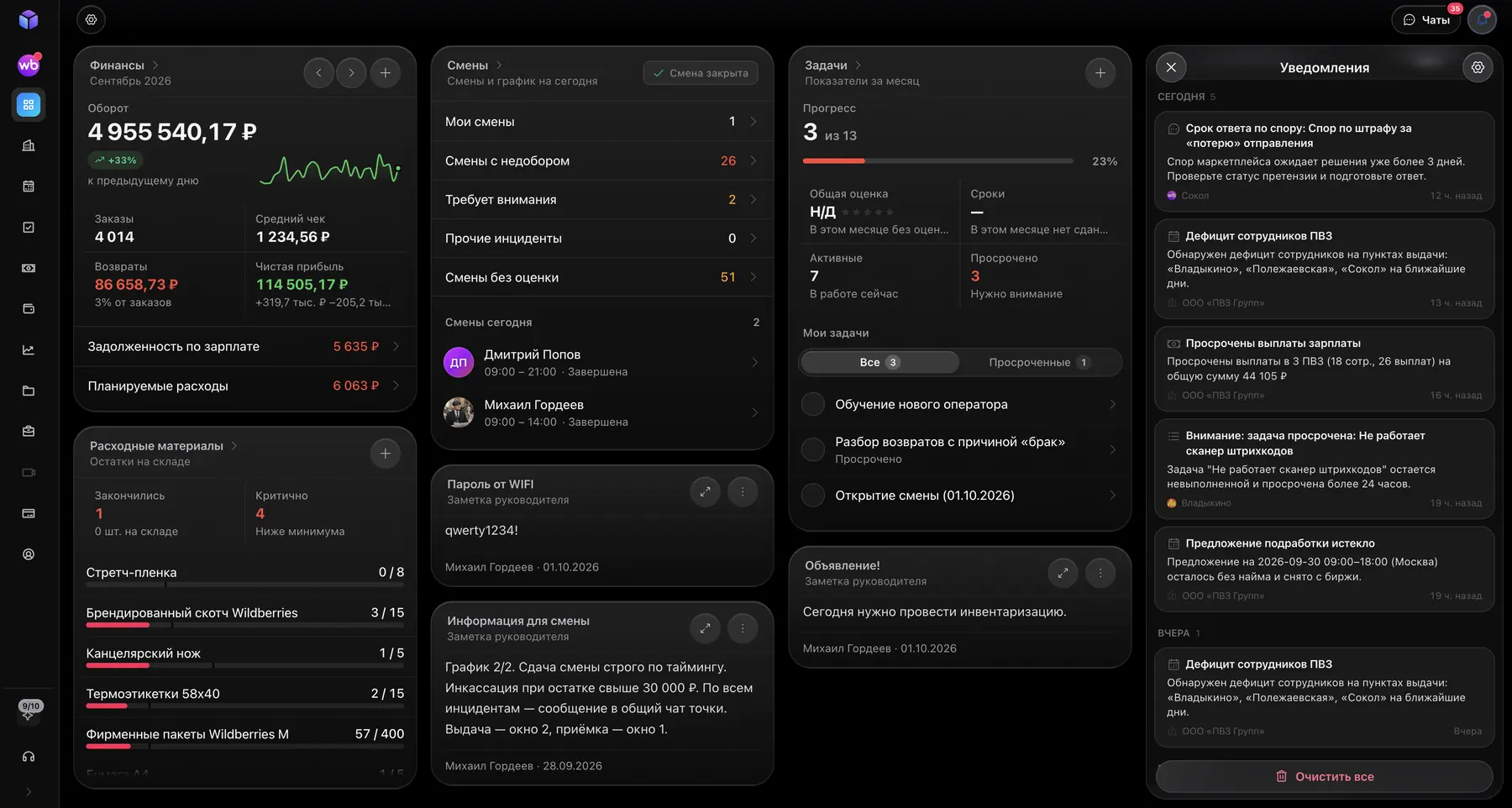
    PVZerium main screen: task, finance and shift widgets
    PVZerium main screen: task, finance and shift widgets
    Works with
    WildberriesOzonЯндекс МаркетСДЭКBoxberryDPD
    and other networks

    Platform capabilities

    01 / 08

    Shifts and schedule

    Who's at the point right now, where people are missing, what the planning horizon is. Shortfalls are visible at once — not in an evening chat.

    PVZerium shift calendar: a month of schedules and attendance statuses
    01

    Opening at the point

    A QR code at the workplace or geolocation check. You can't open a shift from home or from a traffic jam.

    02

    The full picture of the schedule

    Who's on shift, where the gap is, what the planning horizon looks like. If something's off, you get a notification.

    03

    Swap, hand over and SOS

    Shifts can be swapped and handed over. If someone needs to be pulled in on a day off for extra pay, they get an SOS-shift notification.

    02 / 08

    Tasks and control

    Templates, scheduled assignment, and a summary of who's doing what. Chat and decisions live inside the task — not in a general messenger pile.

    PVZerium task board: shift columns, checklists and rating
    01

    Summary and deadlines

    Who's working on what, how much each person has closed, what's overdue. Deadlines are visible — nothing gets lost between messages.

    02

    Disputes and rating

    Convenient dispute resolution and performance rating based on the actual work, not the message thread.

    03

    Shift checklists

    Step-by-step opening, inventory, and closing procedures. Not a single mandatory step is skipped.

    03 / 08

    Finance

    Turnover, expenses, income and fines — without spreadsheets and someone else's Excel. Everything is accessible and clear; nothing needs decoding.

    PVZerium finance calendar: turnover, expenses and plan
    01

    Entry or import

    Enter transactions manually or upload a file. No need to key in day after day when a report already exists.

    02

    Plans and recurring expenses

    Planned and automatic expenses so nothing is missed. A plan for the day and the month, with results right alongside.

    03

    Transaction history

    Where the spending went, what was accrued, what's still ahead. Nothing gets lost between spreadsheets.

    04 / 08

    Team chats

    A shared point channel, direct messages and a chat for each task. All in one window, nothing gets lost.

    PVZerium team chats: point channel and task conversation
    01

    Point channel and direct

    A shared point channel for quick questions and direct chats with employees.

    02

    A chat for every task

    Messages, files and decisions are tied to a specific task. No need to hunt for an agreement in the general chat.

    03

    Personal stays private

    Direct chats aren't visible to everyone. Each person has their own work circle.

    05 / 08

    Salaries and payouts

    Accruals, payouts and savings. Rules by position, employee, whole organization or a specific pickup point.

    PVZerium payroll page: accruals, payouts and balance
    01

    Before payout

    How much has been paid, how much is still owed. You can check KPIs and discipline — to reward someone or not forget a fine.

    02

    Transparency for the employee

    Hours worked, salary breakdown, savings and payout dynamics. The person sees what the total is made of.

    03

    Rates and conditions

    Pay by hours, by shift or fixed. Rules for a position, a point or a person — all in one place.

    06 / 08

    Analytics

    Easy to track many metrics and see what's going wrong — per pickup point and across the whole network.

    PVZerium analytics: revenue structure and point comparison
    01

    Money structure

    What revenue and expenses are made of by category. Where the profit is, where the leak is, which point stands out from the rest.

    02

    Comparison and forecast

    Period over period, point against point, activity forecasts. A failure shows up before it becomes a habit.

    03

    Any period

    Day, week, month, year or a custom range. Forecasts and comparisons rebuild for the chosen period.

    07 / 08

    Network, permissions and people

    One point or several. Real staff invited by you, or working solo. Switching without logging in again.

    Organizations and pickup points in PVZerium
    01

    Flexible access permissions

    Owner, manager, shift lead, employee. Everyone gets only the points and actions they need.

    02

    Efficiency across the network

    Business metrics, ratings and efficiency are visible per person and across the whole network.

    03

    The whole network in one window

    How many points, who works where and what the load is. Switching between points without logging in again.

    08 / 08

    Export, import and files

    A ready-made Excel file or printout. If a report already exists, it can be uploaded. Documents and instructions in one place.

    Files and regulations in PVZerium
    01

    Regulations and instructions

    Point documents in one place: instructions, policies and acts. A new employee gets access with one button.

    02

    Tests and certification

    Employee standard knowledge checks directly in the system before an independent shift.

    03

    Shifts, finance, analytics

    The fields and period you need in a ready-made file. Or print the schedule right away. Marketplace file imports so you don't key in day after day.

    New feature100% free

    Thermal label and barcode printing

    Generate and print warehouse bin labels directly from your browser — no apps or drivers required. Supports thermal roll printers and standard A4 sheets. Completely free for all pickup points.

    Open label printing

    Directly from the browser

    01

    No standalone software, plugins, or driver installations. Open the service in any desktop or tablet browser and print labels in a single click.

    No software installation

    Any printer and paper

    02

    Pre-configured templates for 58×40 and 58×30 mm thermal rolls, A4 adhesive sheets (3×8 grid, 24 labels), or plain paper with cut guidelines.

    Thermal printers · A4 sheets

    Barcodes and bin addressing

    03

    Crisp 1D Code-128 barcodes and bold bin numbers. Instant scanning with WB, Ozon, and Yandex Market barcode readers. Quick spot replacement for damaged bins.

    Code-128 · Flawless scanning
    New Feature

    Staff Blacklist

    Open marketplace incident registry: verify candidates before hiring and protect your pickup point from violations.

    Check Blacklist

    Search by Contact

    01

    Candidate check by phone number, Telegram username (@username), Telegram ID, or full name.

    Phone · Telegram · Full Name

    Incident Records

    02

    Real incident logs: shift no-shows, register shortages, item damage, or parcel tampering.

    WB · Ozon · Yandex · CDEK

    Risk Prevention

    03

    Protect your inventory and cash register before the shift. Make informed decisions regarding financial liability.

    Safe Hiring

    And that is not all

    An ecosystem of modules covering all the needs of pickup points of any size.

    Shift exchange

    Find part-time workers and swap shifts across pickup points in real time without phone calls.

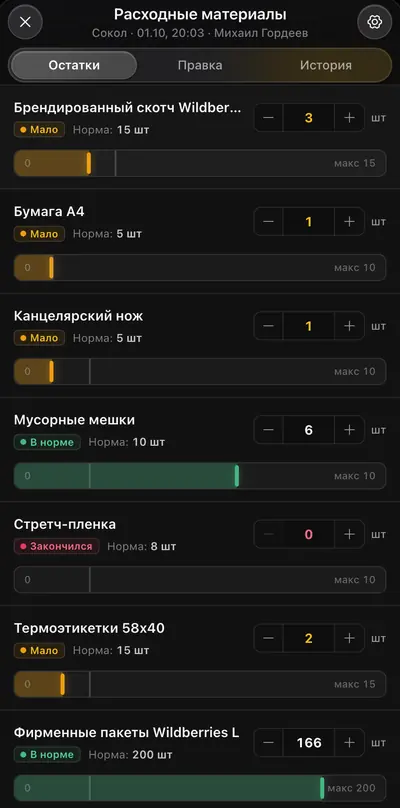
    Supplies & packaging

    Stock tracking for consumables, tape, and bags. Auto-reorder before supplies run out.

    Gamification & KPI

    Team motivation through achievements, levels, and leaderboards for intake speed and orderliness.

    Driven by your feedback

    Weekly updates and new features built directly on suggestions from actual pickup point owners.

    An interface that's comfortable to work in every day.

    One interface on computer, tablet and phone. Light and dark themes. Notifications are tuned so nothing important is missed and pushes don't flood your day.

    • ComputerWindows and macOS
    • TabletiPadOS and Android
    • SmartphoneiOS and Android

    Two ways of working

    For owners: control and order
    For staff: convenience and transparency

    A single space where everyone sees exactly what they need for calm, efficient work.

    For PVZ owners

    Automation and order

    No need to keep the whole network in your head or catch up on shifts in the evening. The owner sees the state of every point and can step away from day-to-day operations without losing control.

    • A clear picture of the network: what's happening at each point, without piecing it together from chats
    • A dedicated view for everyone: the owner sees the network, the manager runs the point
    • Money and people in one place — no evening of reconciling spreadsheets
    • Decisions on time: the system flags a failure while the shift is still running

    One login, the whole network. Points, people and money don't scatter across chats and files.

    For PVZ staff

    Stability and earnings

    Staff never have to ask "what's on today?" or "how much did I make?". The shift, tasks and money are all assembled for them — not for the owner's report.

    • Clear what the money is for: the total is no surprise at the end of the month
    • You can pick up an extra shift when it's convenient
    • The whole workday fits in your phone — no separate spreadsheets and chats
    • What needs doing today is in the system, not buried in messages

    Your phone on shift. It's clear what to do and where the total came from.

    Up and running in 5 minutes

    Ready to see
    your network differently?

    Launch the system for your pickup points right now. No lengthy rollout and no complex setup.

    Start for free
    PVZerium© 2026 PVZerium
    Telegram communityPrivacyTerms